If your business lives on WhatsApp, you know the feeling: hundreds of unread chats, three staff passing one phone around, the same question about delivery fees answered fifty times a day, and customers who quietly buy elsewhere because nobody replied. Big companies solve this with help-desk software and the official WhatsApp API. This guide makes a specific claim: a big online store can run the same kind of professional WhatsApp help desk, with a shared team inbox, an AI assistant that answers common questions, and 10,000 replies a month, for under KSh 15,000 a month in running costs, even after Meta's newest charges. Then it proves it with published prices and the arithmetic, shows exactly how to set it up with Chatwoot, an open-source help desk with nearly 38,000 GitHub stars, and explains how you could turn the same setup into a SaaS for other businesses.
The pain: why WhatsApp breaks a growing business
WhatsApp is where Kenyan customers ask questions, place orders and complain. The free WhatsApp Business app is built for one person on one phone, and it works until messages outgrow that person. The problems that follow are predictable:
- One phone, many staff. The number lives on one device, so staff take turns, chats get missed at shift changes, and nobody knows who promised what.
- No ownership. There is no way to assign a chat to a person or team, so two people answer the same customer or, more often, nobody does.
- The same ten questions all day. Delivery fees, delivery areas, how to pay with M-Pesa, stock, sizes, opening hours and returns. Each is typed again by hand.
- Slow replies lose sales. A customer who waits hours for a price often buys from whoever answered first.
- History walks out the door. When a staff member leaves with a phone or a personal number, the customer conversations and context leave too.
- No numbers. You cannot see how many chats came in, how fast you replied, which staff member is overloaded or which questions keep coming.
- Customer data on personal phones. Names, phone numbers, addresses and order details scattered across staff devices is a data protection risk under Kenya's Data Protection Act.
The solution: Chatwoot on the official WhatsApp API
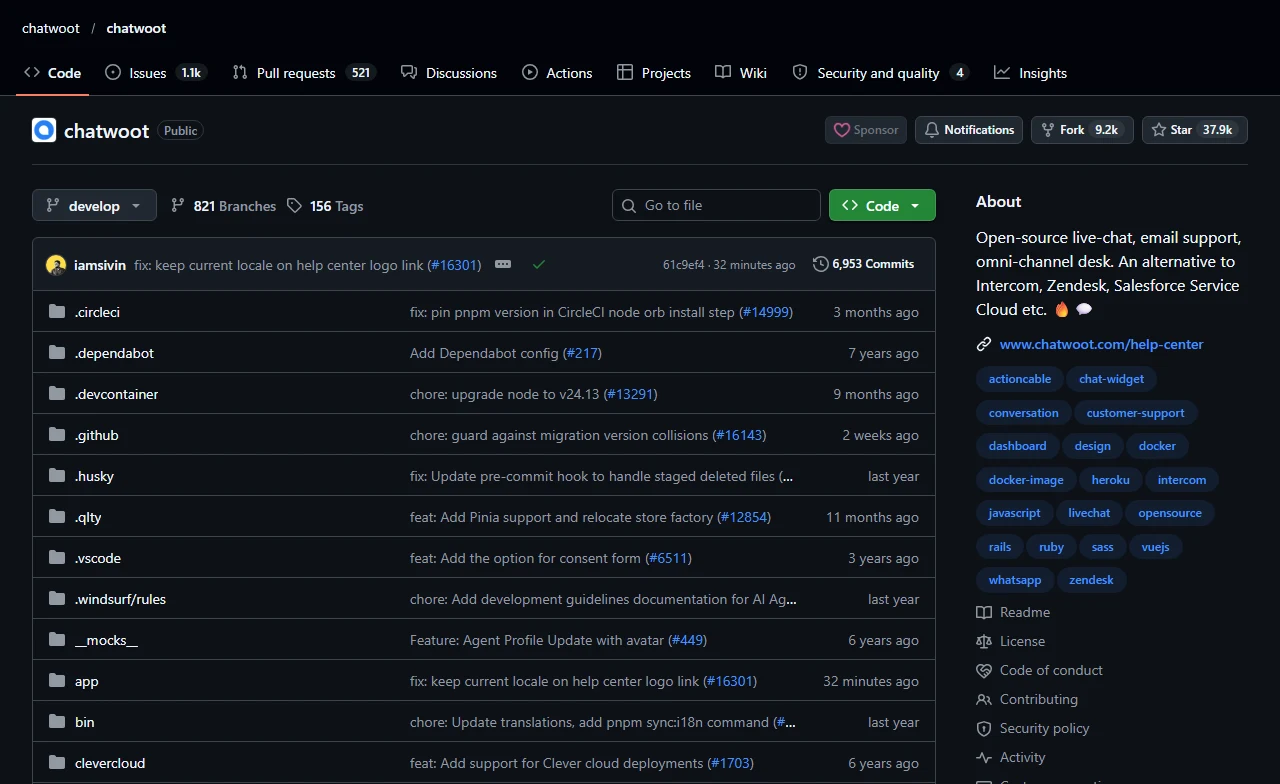
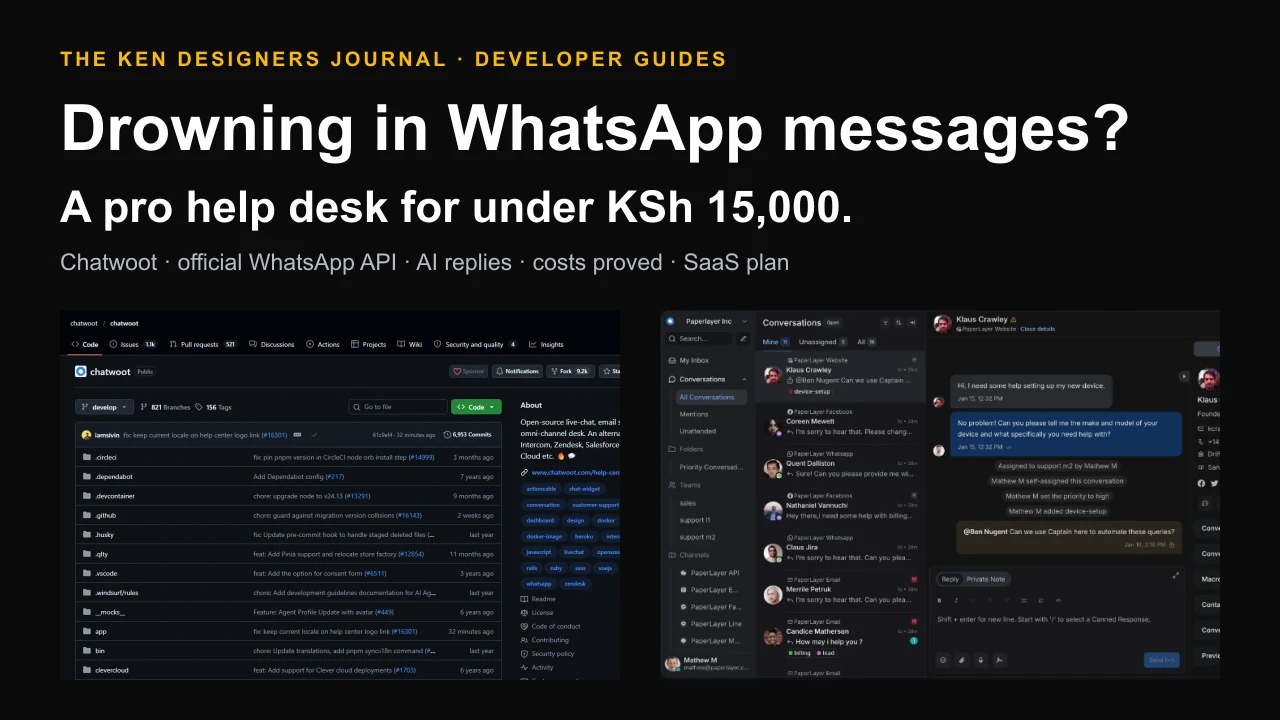
Chatwoot is an open-source customer support platform that puts every conversation, from WhatsApp, website live chat, email, Facebook, Instagram, Telegram, SMS and more, into one shared inbox your whole team works from. It describes itself as an open-source alternative to Intercom, Zendesk and Salesforce Service Cloud.
It is mature and widely used. When we checked on 18 October 2026, the repository had 37,925 stars, 9,246 forks, about 385 contributors and 6,953 commits since 2019, with version 4.18.0 released on 18 September 2026. Its README showed more than 11 million Docker image pulls.
Crucially, Chatwoot connects to WhatsApp through Meta's official WhatsApp Cloud API, either by entering your WhatsApp account details or through Meta's embedded signup flow. That is the route big businesses use, and it is the one that keeps your number safe.
How Chatwoot fixes each pain
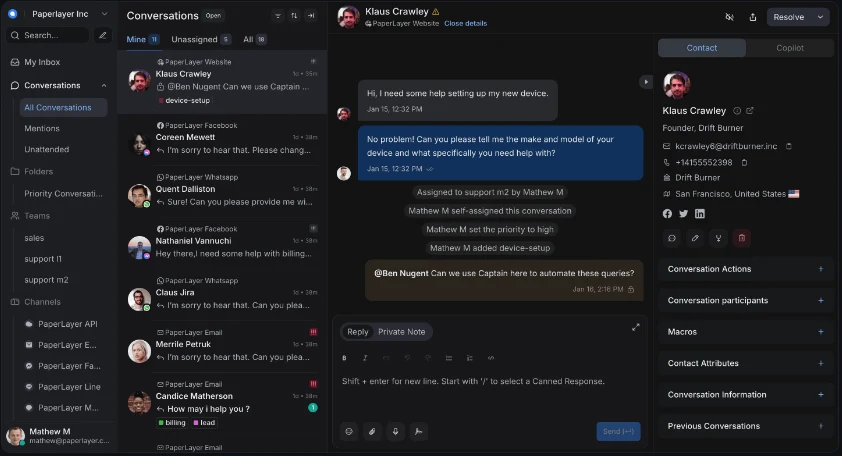
Each feature below is listed in Chatwoot's README. The table maps them to the problems above.
| The pain | Chatwoot feature | What changes |
|---|---|---|
| One phone, many staff | Shared inbox in the browser and mobile apps | Every agent works the same WhatsApp number from their own login |
| No ownership | Auto-assignment, teams and agent capacity | Each chat has one owner; new chats go to whoever is available |
| Same questions all day | Canned responses, macros and an AI bot | Common answers in two keystrokes, or answered automatically |
| Slow replies | Business hours, auto-responders and priorities | Customers get an immediate acknowledgement and urgent chats rise to the top |
| History leaves with staff | Contact profiles and full conversation history | The business owns every conversation, not the employee |
| No numbers | Conversation, agent, team and CSAT reports | See volume, first-response time and satisfaction by agent |
| Data on personal phones | Self-hosted server you control | Customer data stays in one place you secure and govern |
| Order questions | Shopify integration and dashboard apps | See a customer's orders beside the chat, or embed your own order lookup |
Why not the unofficial WhatsApp tools?
You will find popular open-source projects that connect to WhatsApp without Meta's API, by automating WhatsApp Web. Evolution API, for example, offers a mode based on the Baileys library alongside the official Cloud API, and its README notes that the WhatsApp Web method may have limitations compared with official APIs.
The Baileys project itself states that it is not affiliated, associated, authorised or endorsed by WhatsApp, and that its maintainers do not condone using it in ways that violate WhatsApp's terms of service. For a hobby project that may be acceptable. For a big store whose WhatsApp number is its storefront, the risk of losing that number is not worth the savings. Use the official API, as in this guide.
The proof: what it actually costs
Here is the claim tested with published prices and stated assumptions. We model a big online store with one WhatsApp number, about 10,000 replies to customers a month, a team of agents, and an AI bot that handles about 6,000 of those replies. We convert dollars at KSh 129.68, the rate tech-ish used on 30 September 2026.
1. Chatwoot software: $0. The self-hosted Community Edition is free. Chatwoot's self-hosted pricing page lists Captain AI, voice calls, custom branding, agent capacity, roles and permissions, single sign-on, SLA policies and priority support as paid extras, so we use none of them and connect our own AI instead.
2. Server: $48. Chatwoot's requirements recommend at least 4 CPU cores and 4 GB of RAM for up to 10,000 conversations a day, which is far more than our 10,000 replies a month. DigitalOcean's Basic Droplet with 4 vCPUs and 8 GB of RAM is listed at $48 a month, leaving plenty of headroom.
3. Backups and file storage: about $8. An allowance for off-server backups and attachment storage. This is our estimate; prices vary by provider.
4. WhatsApp replies: $0 to $36. This is where the sources disagree, so we price the worst case. Meta's developer pricing page, as we read it on 18 October 2026, says all non-template messages sent within the 24-hour customer service window are free. Several Kenyan outlets, including tech-ish and Techweez, report that from 1 October 2026 Meta charges service replies beyond 1,000 free per number each month, at about USD 0.0040 (about KSh 0.52) per delivered message to a Kenyan number. In that case, 10,000 replies cost 9,000 x $0.004 = $36.
5. AI replies: about $18. We assume each AI reply sends about 2,000 tokens (your store facts plus the question) and receives about 200. At xAI's listed grok-4.3 price of $1.25 per million input tokens and $2.50 per million output tokens, each reply costs about $0.0025 + $0.0005 = $0.003, so 6,000 replies cost about $18. Any comparable model works; check its current price.
Total: about $110 a month, or roughly KSh 14,300, in the worst case, including Meta's reported new charges. Without those charges it is about $74, or KSh 9,600. Either way it is under KSh 15,000, and the claim holds.
| Item | Assumption or source | USD | KSh (at 129.68) |
|---|---|---|---|
| Chatwoot Community Edition | Self-hosted, free | $0 | 0 |
| Server | DigitalOcean Basic, 4 vCPU / 8 GB | $48 | 6,225 |
| Backups and storage | Our estimate | $8 | 1,037 |
| WhatsApp service replies | 9,000 above the reported free 1,000, at $0.004 | $36 | 4,668 |
| AI replies | 6,000 replies at about $0.003 each | $18 | 2,334 |
| Total | Worst case | $110 | about 14,300 |
What the proof does not include, and how it scales
Your team's time. Software does not reply to complicated complaints. The saving comes from the AI bot and canned replies handling routine questions, so the same team can handle far more chats. How many depends on your mix of questions.
Paid templates. Messages you send first, such as order confirmations, delivery updates and promotions, are template messages, which Meta charges by category and country. Marketing templates cost much more than replies; check your rate card in WhatsApp Manager before sending campaigns.
Set-up work. Someone has to install, configure and maintain the system, either your developer or a hired one.
At double the volume (20,000 replies, 12,000 by AI), the worst case rises to about $48 + $8 + $76 + $36 = $168, roughly KSh 21,800, on the same server.
For comparison: Chatwoot's own hosted cloud lists its Business plan at $39 per agent per month, including 500 Captain AI credits, with extra credits at $20 per 1,000. For five agents that is $195 a month before WhatsApp charges. Hosted is simpler; self-hosted is cheaper at scale if you have the skills to run it.
Before you start: what you need
Have these ready before installing and the set-up takes an afternoon instead of a week.
- A Meta Business portfolio for your company, ideally verified, with access to WhatsApp Manager.
- A phone number for the API. A number used on the WhatsApp Business platform is managed through Meta, not a phone app. Check Meta's current options if you want to keep using the same number in the Business app.
- A payment method in WhatsApp Manager, so replies do not stop if charges apply after the free allowance.
- A Linux server (Ubuntu) with at least 4 vCPUs and 4 to 8 GB of RAM, and a subdomain such as chat.yourstore.co.ke.
- An email account for sending invitations and password resets (SMTP details).
- Your store facts written down: delivery areas and fees, payment steps for M-Pesa, return policy, opening hours, and product questions you answer daily. This becomes your canned replies and your AI bot's knowledge.
Step 1: install Chatwoot
Chatwoot's official production guide uses Docker Compose. Download its environment template and compose file, set your secrets and passwords, prepare the database and start the services. The containers bind to localhost only, which is safe: the next step puts HTTPS in front of them.
Set ENABLE_ACCOUNT_SIGNUP to false so strangers cannot create accounts on your server, and fill in the SMTP settings so you can invite your team. Whenever you update to a newer Chatwoot image, run the database preparation command again to apply migrations.
# On a fresh Ubuntu server (4 vCPU / 8 GB recommended for a busy store)
curl -fsSL https://get.docker.com -o get-docker.sh && sudo sh get-docker.sh
sudo apt install docker-compose-plugin

mkdir chatwoot && cd chatwoot
wget -O .env https://raw.githubusercontent.com/chatwoot/chatwoot/develop/.env.example
wget -O docker-compose.yaml https://raw.githubusercontent.com/chatwoot/chatwoot/develop/docker-compose.production.yaml

# Edit .env: SECRET_KEY_BASE (long random hex), FRONTEND_URL=https://chat.yourstore.co.ke,
# POSTGRES_PASSWORD, REDIS_PASSWORD, SMTP_* for invite emails, ENABLE_ACCOUNT_SIGNUP=false
nano .env
# Put the same Postgres password in docker-compose.yaml
nano docker-compose.yaml

docker compose run --rm rails bundle exec rails db:chatwoot_prepare
docker compose up -d
curl -I localhost:3000/api      # should return 200
Step 2: put it on HTTPS
WhatsApp's webhooks and your team's logins need HTTPS. Caddy is the simplest option: point your subdomain's DNS to the server, write two lines of configuration and Caddy obtains and renews the certificate. Nginx works too, but follow Chatwoot's note about underscores in headers.
Then open https://chat.yourstore.co.ke, create the first administrator account and your company account, and invite your agents by email.
# /etc/caddy/Caddyfile - HTTPS in front of Chatwoot (Caddy gets the certificate)
chat.yourstore.co.ke {
    reverse_proxy 127.0.0.1:3000
}

# Using Nginx instead? Chatwoot's guide says to set
#   underscores_in_headers on;
# because its API uses an api_access_token header with underscores.Step 3: connect your WhatsApp number
In Chatwoot, add a new inbox and choose WhatsApp with the WhatsApp Cloud provider. There are two ways to connect:
- Manual connection: in Meta's developer dashboard, create a Business app with the WhatsApp product, then copy your phone number ID, WhatsApp Business Account ID and a permanent access token (from a system user) into Chatwoot. Chatwoot gives you a webhook URL and verify token to paste back into your Meta app's webhook settings.
- Embedded signup: a super administrator enters your Meta app's App ID, Configuration ID and App Secret in Chatwoot's admin settings. Users can then connect a WhatsApp account through Meta's own login flow, without copying tokens or setting webhooks by hand. This is the route to use if you will connect many numbers, as in the SaaS section.
- Test it: send a WhatsApp message to your number from another phone. It should appear in the Chatwoot inbox, and your reply should arrive on the phone.
- Approve templates: create the message templates you need, such as order confirmations and delivery updates, in WhatsApp Manager. Chatwoot lists the approved templates so agents can send them when the 24-hour window has closed.
Step 4: organise the team so no chat is missed
Most of the benefit comes from organisation, not technology. Set these up in the first week:
- Teams: for example Sales, Orders and Delivery, and Returns. Add each agent to the right team.
- Auto-assignment: turn it on for the WhatsApp inbox so each new chat goes to an available agent, and set agent limits so nobody is overloaded.
- Business hours and auto-responder: tell customers your hours and when to expect a reply, automatically, outside working time.
- Canned responses: write your top 20 answers once. Agents type / and a shortcut, such as /delivery or /mpesa, to insert them.
- Labels: tag chats as order, complaint, wholesale or paid, so you can filter and report on them.
- Automation rules: for example, when a message mentions refund, assign it to the Returns team and mark it high priority.
- Satisfaction surveys (CSAT): ask customers to rate the conversation when it is resolved, and review low scores weekly.
Step 5: add an AI assistant that hands off to humans
Chatwoot's built-in AI agent, Captain, is included in its paid cloud plans and paid self-hosted editions. On the free Community Edition you can connect your own AI through Chatwoot's Agent Bot feature: you create an agent bot with a webhook URL and attach it to your WhatsApp inbox. Chatwoot then sends new incoming messages to your bot, the bot replies through Chatwoot's API, and when it cannot help it changes the conversation's status to open, which passes it to your human team.
The example below is a small Python web service that does exactly that. It answers only from a facts file you write, such as delivery areas, fees, payment steps and returns. It hands the conversation to a person when the answer is not in the facts, when the customer is upset or asks for a refund, or when the question is about a specific order. Using temperature 0 keeps answers consistent.
Keep the bot honest. Let it answer routine questions and nothing else. Never let it promise refunds, discounts or delivery dates it cannot check. Review a sample of its conversations every week, and add answers to the facts file when you see repeated hand-offs. Tell customers they are chatting with an automated assistant and how to reach a person.
# faq_bot.py - a Chatwoot Agent Bot: answers common questions, hands the rest to staff
# pip install flask requests openai
import os, requests
from flask import Flask, request
from openai import OpenAI

CHATWOOT = "https://chat.yourstore.co.ke"
BOT_TOKEN = os.environ["CHATWOOT_BOT_TOKEN"]      # the Agent Bot's access token
llm = OpenAI(api_key=os.environ["LLM_API_KEY"], base_url=os.environ["LLM_BASE_URL"])
STORE_FACTS = open("store_facts.md").read()      # delivery areas, fees, M-Pesa steps, returns
app = Flask(__name__)

def api(path, payload):
    requests.post(f"{CHATWOOT}/api/v1/accounts/{path}", json=payload,
                  headers={"api_access_token": BOT_TOKEN}, timeout=20)

@app.post("/chatwoot")
def webhook():
    e = request.json
    if e.get("event") != "message_created" or e.get("message_type") != "incoming":
        return "", 200
    acct, conv = e["account"]["id"], e["conversation"]["id"]
    reply = llm.chat.completions.create(
        model=os.environ["LLM_MODEL"], temperature=0,
        messages=[{"role": "system", "content":
                   "You answer customers of our store using ONLY these facts:\n" + STORE_FACTS +
                   "\nIf the answer is not in the facts, or the customer is upset, wants a refund, "
                   "or asks about a specific order, reply exactly HANDOFF."},
                  {"role": "user", "content": e.get("content") or ""}],
    ).choices[0].message.content.strip()

    if reply == "HANDOFF":
        api(f"{acct}/conversations/{conv}/messages",
            {"content": "Thanks! A member of our team will reply shortly.", "message_type": "outgoing"})
        api(f"{acct}/conversations/{conv}/toggle_status", {"status": "open"})   # to a human
    else:
        api(f"{acct}/conversations/{conv}/messages", {"content": reply, "message_type": "outgoing"})
    return "", 200
Step 6: connect orders, measure, and keep it running
Treat the help desk like any business system: someone owns it, reviews it weekly and keeps it updated.
- Orders: if you sell on Shopify, Chatwoot's Shopify integration shows a customer's orders beside the chat. For WooCommerce or a custom store, a dashboard app can embed your own order-lookup page in Chatwoot's sidebar.
- Reports: review weekly conversation volume, first-response time, resolution time and CSAT by agent, and the top labels. That tells you where to add staff, canned replies or bot answers.
- Backups: back up the Postgres database and stored attachments every night to separate storage, and test a restore.
- Updates: update the Chatwoot image monthly, run the database preparation command, and read the release notes first.
- Security: use strong passwords and two-step verification for agents, keep the server patched, and remove agents the day they leave.
- Data protection: you are holding customers' personal data. Publish a privacy notice, keep only what you need, set retention rules and check whether you must register with Kenya's Office of the Data Protection Commissioner.
Turning this into a SaaS for other businesses
Every busy WhatsApp business in Kenya has the same problem, which makes this a natural SaaS: a WhatsApp help desk with an AI assistant, priced in shillings, paid by M-Pesa, and set up for them. Chatwoot already provides much of the platform:
- Multi-tenancy is built in. One Chatwoot installation can host many separate accounts, one per client business, each with its own inboxes, agents and data. Platform APIs, available on self-hosted installations, let you create and manage accounts and users from your own sign-up and billing system.
- Clients connect their own WhatsApp numbers through embedded signup, using their own Meta business portfolio. Meta requires companies that onboard other businesses' WhatsApp accounts to meet its requirements for technology providers or partners, which include business verification and app review. Check Meta's current rules before you sell.
- Your AI bot is the product. The free Community Edition does not include Captain, so your own Agent Bot, trained on each client's facts, with hand-off rules and weekly tuning, is a feature you can charge for.
- Billing in shillings. Charge a monthly fee per business or per agent, plus AI usage, collected by M-Pesa. Paystack's Kenyan pricing lists M-Pesa at 1.5% per transaction with no monthly fee.
- Done-for-you set-up is the hook. Most businesses cannot set up the WhatsApp API themselves. A set-up fee that includes connecting their number, writing their canned replies and bot facts, and training their staff is often what wins the sale.
SaaS licensing, branding and unit economics
Licence. Chatwoot's code is MIT-licensed except the enterprise folder, which may only be used in production with a paid Chatwoot enterprise licence. A SaaS built on the free Community Edition must not use enterprise features. Chatwoot's self-hosted pricing lists custom branding among the paid features, so a fully white-labelled product may need either a licence or careful work that changes only MIT-licensed code. Do not call your product Chatwoot or imply endorsement.
Where the money is. Your costs per client are a share of the server, their AI usage and support time; WhatsApp charges are billed by Meta to each client's own account if they connect their own portfolio. In our cost model, a big store's AI usage was about $18 a month. Price above your real per-client cost, including support, and charge a set-up fee for onboarding.
Illustrative example: if a client pays a monthly fee equal to $60 and uses $10 of AI, your share of a server shared by ten clients is about $5, payment fees by M-Pesa are about $0.90, and you spend an hour a month on their support, the margin depends on what that hour costs you. Run this calculation with your own figures before setting prices. These are planning numbers, not market rates.
The real risk is support. A help desk is business-critical: if it goes down, your client stops answering customers. Monitor uptime, keep backups and offer clear response times. That reliability is what clients pay for.
Common mistakes
Start small: one inbox, one team, ten canned replies and a bot that answers five questions. Expand once that works.
- Using an unofficial WhatsApp library for a valuable number. Use the official Cloud API.
- Letting the AI answer everything. Restrict it to known facts and hand off anything about money, specific orders or complaints.
- Forgetting the 24-hour window. After 24 hours without a customer message, you can only send approved templates, which may be charged.
- Sending marketing templates without checking prices. Marketing messages cost far more than replies.
- Not adding a payment method. If charges apply after the free allowance, replies can stop when it runs out.
- Skipping backups. Your conversation history is business data; back it up and test restores.
- Buying software instead of fixing the process. Teams, assignment and canned replies matter more than any feature.
A practical 14-day plan
Days 1 to 2: list your top 30 customer questions from recent chats, and write the answers. Set up or verify your Meta Business portfolio.
Days 3 to 4: rent the server, install Chatwoot, put it on HTTPS and invite your team.
Days 5 to 6: connect your WhatsApp number through the Cloud API, test sending and receiving, and add a payment method in WhatsApp Manager.
Days 7 to 8: create teams, auto-assignment, business hours, labels and your first 20 canned responses.
Days 9 to 11: deploy the AI bot with your facts file, let it handle five common questions, and review every hand-off.
Days 12 to 14: go live for all customers, watch the reports daily, and add answers where the bot hands off most. Use the downloadable checklist below to keep track.
Questions people ask
Is Chatwoot free?
The self-hosted Community Edition is free, and the code outside its enterprise folder is MIT-licensed. Paid features such as the Captain AI agent, custom branding, roles and permissions, SSO and SLA policies need a paid self-hosted plan or Chatwoot's hosted cloud. You still pay for your server and any WhatsApp and AI usage.
Does it work with the normal WhatsApp Business app?
Chatwoot connects through Meta's WhatsApp Business Platform (Cloud API), not the phone app. The number is then managed through Meta, and your team replies from Chatwoot in the browser or mobile apps. Check Meta's current options if you want to keep using the same number in the Business app.
How much does the WhatsApp API cost in Kenya?
Meta's developer pricing page, as we read it on 18 October 2026, says replies inside the 24-hour customer service window are free. Kenyan tech outlets report that from 1 October 2026, service replies beyond 1,000 a month per number cost about USD 0.0040 (about KSh 0.52) each. Template messages you start, especially marketing, are charged by category. Check the billing section of your WhatsApp Manager for the rates that apply to you.
Can an AI bot reply to WhatsApp customers automatically?
Yes. Chatwoot's paid plans include its Captain AI agent, and on the free edition you can connect your own AI through the Agent Bot API. Limit it to questions you have written answers for, and make it hand difficult or sensitive conversations to a person.
How many messages can one Chatwoot server handle?
Chatwoot's requirements say a server with 4 CPU cores and 4 GB of RAM supports up to 10,000 conversations a day, and 8 cores with 8 GB up to 20,000 a day. Beyond that, you add more application servers.
Can I sell this as a service to other businesses?
Yes, within the licence. The MIT-licensed core supports many client accounts on one installation, and WhatsApp embedded signup lets clients connect their own numbers. Avoid the enterprise features unless you buy a licence, use your own brand, and check Meta's requirements for onboarding other businesses' WhatsApp accounts.
Put this guide to work
Download a practical template, fill in your requirements and bring it to your project conversation.
- WhatsApp help desk setup checklist ↓
Meta account, server, Chatwoot install, WhatsApp connection, team set-up, AI bot rules, costs, data protection and SaaS checks in one printable list.
Sources and research notes
Sources checked 18 October 2026. Recommendations and labelled scenarios are editorial guidance. Provider prices and capabilities can change; confirm them before purchasing.
- Chatwoot: upstream repository
Purpose, features, integrations, Captain description, repository metrics and README screenshots used in this guide.
- Chatwoot: LICENSE
MIT licence for code outside the enterprise folder.
- Chatwoot: enterprise licence
Production use of the enterprise folder requires a paid Chatwoot licence.
- Chatwoot: self-hosted system requirements
CPU and RAM sizing for 10,000 and 20,000 conversations a day.
- Chatwoot: Docker production deployment guide
Installation steps, localhost binding, migrations and the Nginx underscores note.
- Chatwoot: WhatsApp embedded signup
Super-admin configuration for connecting WhatsApp accounts through Meta's signup flow.
- Chatwoot: API reference
Application, client and platform APIs, agent bots and conversation status.
- Chatwoot: cloud pricing
Hosted plan prices per agent, Captain credits and extra credit price.
- Chatwoot: self-hosted plans
Free Community Edition and features excluded from it.
- Meta: WhatsApp Business Platform pricing
Per-message pricing, free messages within the customer service window, template categories and Kenya's pricing region.
- tech-ish: WhatsApp Business Platform charges start today
Reported 1 October 2026 service-reply charge, 1,000 free allowance, Kenyan rate and the KSh 129.68 exchange rate.
- Techweez: WhatsApp Business pricing October 2026
Corroborating report of the service-reply charge and free allowance.
- Evolution API: repository
WhatsApp Web (Baileys) and official Cloud API modes and the README's note on limitations.
- Baileys: repository disclaimer
Not affiliated with WhatsApp; maintainers do not condone violating WhatsApp's terms.
- DigitalOcean: Droplet pricing
Server price used in the cost model.
- xAI: models and pricing
Token prices used to estimate AI reply costs.
- Paystack Kenya pricing
M-Pesa transaction fee for SaaS billing.
- Office of the Data Protection Commissioner, Kenya
Regulator for the Data Protection Act, 2019.

About this guide
AI-assisted research and original buyer checklists from the studio. Official documentation is linked above; examples are illustrative and do not describe verified client outcomes.
Ask Ken on WhatsApp